

The Bing Maps Multi-Itinerary Optimization API is being retired by Microsoft on 6/30/2025. As a result, users of the Bing Maps MIO API will have to migrate to another service. To avoid service disruptions, users must move to an alternative solution by that date. However, Microsoft doesn’t provide a similar alternative service to the Bing Maps Multi-Itinerary Optimization (MIO) API, which means users will have to find and migrate to a viable, alternative service. The Bing Maps MIO API was useful because it supported multiple vehicles, hence if you have 100 stops and 5 vehicles, it would balance the stops between the available vehicles. The web mapping experts at OnTerra Systems have developed this Bing Maps Multi Itinerary Optimization API Migration Guide to highlight how RouteSavvy API PLUS is an excellent alternative.
RouteSavvy API PLUS is an ideal alternative to the Bing Maps MIO API. Why? RouteSavvy API PLUS has all the important features (i.e.: time windows) that are needed for most route itinerary optimization scenarios. RouteSavvy API PLUS offers a simple, easy-to-use set of input parameters, features high performance with fast API response times, and has cost-effective pricing.
Check out the Bing Maps Multi Itinerary API Migration Guide & learn!
Bing Maps Multi Itinerary API Migration Guide: RouteSavvy API PLUS Feature Highlights
- Up to 1,000 locations (route stops) can be optimized across a maximum of 50 vehicles (resultant routes) in a single request
- Ability to specify unique, friendly names for stops and vehicles in the API request
- Support for optimizing routes based on multiple availability time windows for a given stop location
- Detailed driving instructions steps are conveniently included in the API response, eliminating the need to make additional API requests to get driving directions for the route
- GET and POST request options are available for making the API requests
Bing Maps Multi Itinerary Optimization API Migration Guide: Pricing Comparison Moving to RouteSavvy API Plus
Bing Maps MIO API:
Bing Maps MIO API transactions are calculated based on the number of itinerary agents multiplied by the number of itinerary items in the request. For a calculation of 2 agents (vehicles) and 15 locations, that would result in 30 billable transactions. The cost of this example would be $0.750.
RouteSavvy API PLUS:
RouteSavvy API Plus transactions also are calculated based on the number of itinerary agents multiplied by the number of itinerary items in the request. However, RouteSavvy API PLUS comes with a much lower per transaction rate. For the same calculation with RouteSavvy API PLUS, the comparable cost would be $0.018.
This is a relatively small example, and only illustrates pricing for one individual API calculation. The following table models this same example if the same calculation were to be made once a day for an entire year. Additional examples of daily calculations are included, with increasingly larger numbers of both agents (vehicles) and locations (stops), similarly extrapolated for an entire year to show more real-world cost comparisons. The bottom line is that migrating to RouteSavvy API PLUS provides powerful functionality, at a much lower cost - and it solves the problem of finding an alternative to the Bing Maps MIO API.
|
Daily API Call |
Bing Maps MIO API |
RouteSavvy API PLUS |
|||||
|
#Vehicles |
#Stops |
Annual Tranactions |
Rate/Transaction |
Total$ |
Annual Transactions |
Rate/Transaction |
Total$ |
|
2 |
15 |
10,950 |
$0.0250 |
$273.75 |
10,950 |
$0.0006 |
$6.57 |
|
5 |
50 |
91,250 |
$0.0150 |
$1,368.75 |
91,250 |
$0.0006 |
$54.75 |
|
20 |
250 |
1,825,000 |
$0.0075 |
$13,687.50 |
1,825,000 |
$0.0006 |
$1,095.00 |
|
50 |
1000 |
18,250,000 |
$0.0038 |
$69,350.00 |
18,250,000 |
$0.0003 |
$5,475.00 |
Get Started with RouteSavvy API PLUS Today:
Here are the resources to get started with RouteSavvy API PLUS:
- General RouteSavvy API PLUS info and technical documentation.
- Start your free trial of RouteSavvy API PLUS
- Contact OnTerra with any questions about RouteSavvy PLUS API
Bing Maps Multi Intinerary Optimization API Migration Guide: A Comparison of API Requests
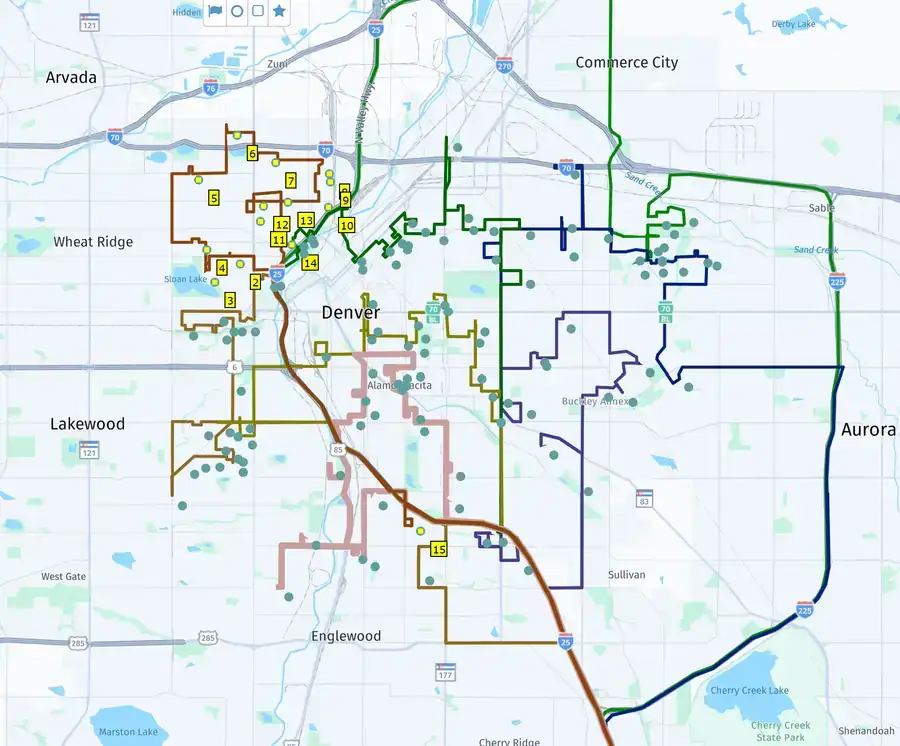
This simple scenario example has two service technicians and fifteen customer locations that need to be serviced for the day. Each service technician has a specified availability start and end time, as well as starting and ending locations – specifically a depot location where the technicians start and end their workday. Each customer location has a time window of when the customer can be serviced and a visit duration (in minutes) for the type of service needed.
Bing Maps Multi-Itinerary Optimization API v1 GET request:
http://dev.virtualearth.net/REST/V1/Routes/OptimizeItinerary?itineraryAgents=Vehicle01_09:00:00|39.712797,-104.987282|17:00:00|39.712797,-104.987282;Vehicle02_08:00:00|39.712797,-104.987282|20:00:00|39.712797,-104.987282&itineraryItems=09:00:00_18:00:00_00:30:00_39.761975,-104.907292;09:00:00_18:00:00_01:00:00_39.765176,-104.919965;09:00:00_18:00:00_00:30:00_39.781996,-105.021899;09:00:00_18:00:00_01:00:00_39.750206,-104.933919;09:00:00_18:00:00_00:30:00_39.762898,-104.934401;09:00:00_18:00:00_01:00:00_39.763766,-104.946255;09:00:00_18:00:00_00:30:00_39.764119,-104.953665;09:00:00_18:00:00_01:00:00_39.770528,-105.025323;09:00:00_18:00:00_00:30:00_39.758191,-105.011556;09:00:00_18:00:00_00:30:00_39.758643,-104.981753; 09:00:00_18:00:00_01:00:00_39.781233,-104.731686;09:00:00_18:00:00_00:30:00_39.744187,-104.748137;09:00:00_18:00:00_01:00:00_39.747494,-105.218551;09:00:00_18:00:00_00:30:00_39.717883,-105.188095;09:00:00_18:00:00_00:30:00_40.175983,-105.102829&key=YourKey
RouteSavvy API PLUS GET request:
http://api.routesavvy.com/plus/RSAPI.svc/GETOptimize?query={"Locations": [{"Name": "Depot","Latitude": 39.712797,"Longitude": -104.987282},{"Name": "Customer001","Latitude": 39.761975,"Longitude": -104.907292,"VisitDurationInMinutes": 30,"Time_Window": [{"earliest": "08:00","latest": "18:00"}]},{"Name": "Customer002","Latitude": 39.765176,"Longitude": -104.919965,"VisitDurationInMinutes": 60,"Time_Window": [{"earliest": "08:00","latest": "18:00"}]},{"Name": "Customer003","Latitude": 39.781996,"Longitude": -105.021899,"VisitDurationInMinutes": 30,"Time_Window": [{"earliest": "08:00","latest": "18:00"}]},{"Name": "Customer004","Latitude": 39.750206,"Longitude": -104.933919,"VisitDurationInMinutes": 60,"Time_Window": [{"earliest": "08:00","latest": "18:00"}]},{"Name": "Customer005","Latitude": 39.762898,"Longitude": -104.934401,"VisitDurationInMinutes": 30,"Time_Window": [{"earliest": "08:00","latest": "18:00"}]},{"Name": "Customer006","Latitude": 39.763766,"Longitude": -104.946255,"VisitDurationInMinutes": 60,"Time_Window": [{"earliest": "08:00","latest": "18:00"}]},{"Name": "Customer007","Latitude": 39.764119,"Longitude": -104.953665,"VisitDurationInMinutes": 30,"Time_Window": [{"earliest": "08:00","latest": "18:00"}]},{"Name": "Customer008","Latitude": 39.770528,"Longitude": -105.025323,"VisitDurationInMinutes": 60,"Time_Window": [{"earliest": "08:00","latest": "18:00"}]},{"Name": "Customer009","Latitude": 39.758191,"Longitude": -105.011556,"VisitDurationInMinutes": 30,"Time_Window": [{"earliest": "08:00","latest": "18:00"}]},{"Name": "Customer010","Latitude": 39.758643,"Longitude": -104.981753,"VisitDurationInMinutes": 30,"Time_Window": [{"earliest": "08:00","latest": "18:00"}]},{"Name": "Customer011","Latitude": 39.781233,"Longitude": -104.731686,"VisitDurationInMinutes": 60,"Time_Window": [{"earliest": "08:00","latest": "18:00"}]},{"Name": "Customer012","Latitude": 39.744187,"Longitude": -104.748137,"VisitDurationInMinutes": 30,"Time_Window": [{"earliest": "08:00","latest": "18:00"}]},{"Name": "Customer013","Latitude": 39.747494,"Longitude": -105.218551,"VisitDurationInMinutes": 60,"Time_Window": [{"earliest": "08:00","latest": "18:00"}]},{"Name": "Customer014","Latitude": 39.717883,"Longitude": -105.188095,"VisitDurationInMinutes": 30,"Time_Window": [{"earliest": "08:00","latest": "18:00"}]},{"Name": "Customer015","Latitude": 40.175983,"Longitude": -105.102829,"VisitDurationInMinutes": 30,"Time_Window": [{"earliest": "08:00","latest": "18:00"}]}],"OptimizeParameters":{"AppId": "YourKey","OptimizeType": "time","Departure": "08:00","MinimizeVehicle": false,"Vehicles": [{"vehicle_id": "Vehicle01","StartLocation": "Depot","EndLocation": "Depot","DriverAvailabilityFrom": "09:00","DriverAvailabilityTo":"17:00"},{"vehicle_id": "Vehicle02","StartLocation": "Depot","EndLocation": "Depot","DriverAvailabilityFrom": "08:00","DriverAvailabilityTo": "20:00"}]}}
Bing Maps Multi Itinerary Optimization API Migration Guide: Benefits Of Migrating To RouteSavvy API PLUS
The RouteSavvy Route Optimization API is one of the most affordable, easy-to-use routing APIs on the market today. Here’s a look at its benefits:

EASY TO USE
The RouteSavvy API is built on RESTFUL code standards, making it an easy tool to use.

STREAMLINES DEVELOPMENT TIME
RouteSavvy’s Route API helps speed development time in many ways.

FASTER LAUNCH OF NEW SOFTWARE
The RouteSavvy API helps developers bring new software solutions to market faster.

FREE CODE SAMPLES
The RouteSavvy team has done the heavy lifting for developers. Access our free code samples in C#, Java, JavaScript, Python & VB.NET.

SCALABLE ROUTING
Our Routing APIs are scalable, from a modest amount of stops per route up to 500 stops for the standard RouteSavvy API & up to 1000 stops for RouteSavvy API PLUS.

TRULY ROBUST ROUTING API OFFERING
The RouteSavvy API developers are long-time routing software experts who have built affordable & robust routing APIs.
Bing Maps Multi Itinerary Optimization API Migration Guide: RouteSavvy API Documentation & Code Samples
Download RouteSavvy API Documentation
Why RouteSavvy API PLUS Is a Strong Bing Maps MIO Alternative
Microsoft announced the retirement of the Bing Maps Multi-Itinerary Optimization (MIO) API, effective June 30, 2025; applications built on the MIO API stop working after retirement. RouteSavvy API PLUS is a low-cost, high-performance replacement that is easy to integrate into many customer scenarios.
The Bing Maps MIO API solved the Vehicle Routing Problem (VRP): optimizing routes for multiple vehicles and a set of stops. For example, with 5 vehicles and 100 stops for the day, a VRP solution splits the stops across the available vehicles and optimizes each route, balancing the load so each vehicle has a similar amount of work. RouteSavvy API PLUS does this too, and more.
- Supports up to 1,000 stops and 50 vehicles per request, with pricing from $1,200 per year
- Can minimize vehicles as part of the optimization, reducing the number of vehicles you need on a given day
- Automated multi-vehicle route optimization and time windows in a single API request
- RESTful / JSON API that works in multiple programming languages, with free code samples
- Built by developers, for developers, and supported directly by the OnTerra Systems team
See the RouteSavvy API page to compare API tiers, or download the RouteSavvy API PLUS documentation.